
Your money, on
your own machine.
slip/scan brings your bank transactions, receipts and bills together on your own computer — sorted into categories, matched against each other, and turned into budgets and reports — so you can see where the month actually went without handing your finances to anybody's server.
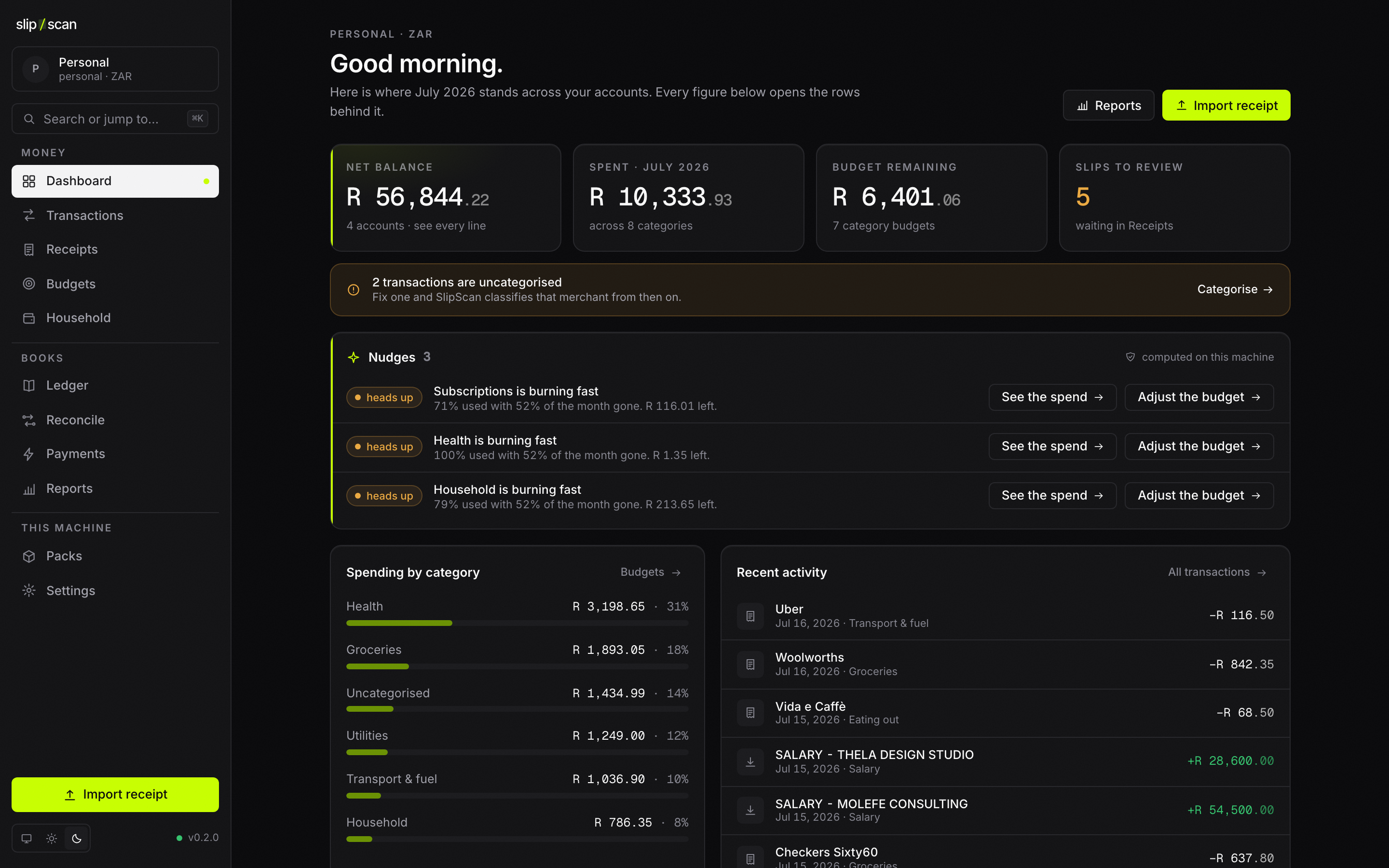
78% of the monthly limit spent with 11 days to go — R1 240.00 left.
Shown: the shipped desktop app with a seeded demo book — none of it is real, and none of it left the machine that rendered it. Every screen is in the gallery below.
Six things it does for you.
Written as what happens to your afternoon, not as what is in the binary. The mono line under each card names the machinery, and the status table further down has the unvarnished version.
Your spending, already sorted Built
Export a statement from your bank and every row lands categorised — groceries, fuel, the subscription you forgot about. Photograph a slip or let it arrive by email and slip/scan reads the line items, the VAT and the discount off it.
Fix a category once and it stays fixed: your correction outranks every shared rule, permanently.
Where the month is going Built rollover not applied
A limit per category, a bar that fills as you spend it, and the amount left against the days still to run. It tells you when a budget is burning fast, when the same charge landed twice, and when something looks like a subscription you never started.
A rollover flag is stored per budget but no number on the screen uses it yet — and the screen says so rather than implying otherwise.
Real books, if you run something Built
Under the friendly screens is a proper double-entry ledger — chart of accounts, journals, trial balance, income statement, balance sheet — and the tax summary your country's profile names, ready to export as CSV.
A posted entry never changes. Corrections are reversals, the way an accountant expects, so the report you ran last quarter still reproduces this quarter.
Who paid for what, at home Built
Mark a transaction with the person it belongs to and get spend per member, contributions, each person's share of a category, and a settle-up view that says plainly who owes whom and how much.
Members are rows in your own book, not logins. Nobody else has to sign up to be counted in the household.
A ping when the money lands Built
Give a customer an EFT reference to quote. When a payment carrying it turns up in your books, an address you registered receives a signed message saying so — enough to release an order, mark an invoice paid, or just tell you.
Detection runs on transactions as they are created — statement imports, entries you make yourself, and now the alert emails your bank sends, once you have installed rules for your bank. That last path is command-line only today.
Your books are a folder you own Built
One SQLite file and your documents, sitting in a folder you can open, move and back up with whatever you already use — iCloud, Dropbox, Syncthing, a NAS, a USB stick.
There is no export step to remember, because your books were never anywhere else. The key in your keychain never travels with the folder.
Real screens, no mockups.
Every shot is the shipped desktop app against a seeded demo book, captured with a pinned clock, locale and timezone so it reproduces byte-for-byte. Step through with the tabs, the arrows, or ← → once the gallery has focus.
You are reading the light theme. The app ships light as a first-class theme, but the committed gallery holds a light capture of the Dashboard only — the other screens below are the dark capture, shown as they were taken rather than recoloured.
You are the server.
Every other finance app asks you to put your transactions and your bank credentials into a database somebody else runs, and then asks you to pay monthly for the privilege. slip/scan does not have that database. There is no slip/scan server — not a small one, not an optional one. Here is what that actually buys you.
Nobody can lose your data, because nobody else has it.
There is no account to create and no company database your rows sit in. Your books are a file on your disk. A breach at a firm you have never heard of cannot expose them, there is nothing to subpoena, and no outage anywhere can lock you out of last month's spending.
No monthly fee, and no bill that shows up later.
Free, and open source under MIT or Apache-2.0. There is no licence check in the binary, no seat count, no tier that gets more expensive when you add a second book, and no free trial quietly turning into a subscription.
Your credentials never leave your keychain.
Mailbox tokens, model keys and signing secrets go into your operating system's own vault. They can be set, rotated, revoked and used — never read back. Not by the app, not by the command line, not by a support agent, because there is no support agent.
It keeps working if this project disappears.
There is no company in the loop that could switch a service off. If everything here stopped tomorrow, the copy on your machine would keep opening, importing and reporting exactly as it does today — and the source is yours to build for as long as you want it.
- Your statement sourceCSV and OFX files you export, or a bank adapter you run in your own session. No aggregator sits in the middle holding a token for your account.
- Your mailboxGeneric IMAP, Gmail or Microsoft Graph — always your account, authenticated by your own OAuth grant or app password, straight from your machine.
- Your LLM or OCR providerBring your own key, or point it at a model running on localhost. The default is
None — manual entry only: extraction is off until you choose a provider. - Your OpenRate instanceOpt-in multi-currency FX from a rate service you host. No URL configured means zero FX calls, ever — not a degraded mode, simply no request.
Communities share rules, never data Built
Other people's work reaches you as a pack — a taxonomy, a set of merchant mappings, classification rules — signed with an ed25519 key and handed over as a file or a git repo. Your transactions never travel the other way, and slip/scan never fetches a pack on its own. A pack id is pinned to the key that first signed it, so nobody can take that name over later.
Not built around one country Built
Nothing country-specific is compiled in. Account seeds, tax rates, the name of the return your books produce and the CSV layouts your banks export all arrive as region profiles — data you pick, not code somebody has to fork. South Africa is the first profile (VAT201); a generic profile covers everywhere else from day one.
Want the wiring rather than the promise? The architecture, the data-flow diagram and the invariants the workspace enforces are all in the docs.
Every feature, with its status attached.
A roadmap reads better than a status table. A status table is the one you can act on. Everything below carries a chip, including the things that would sell better without one, and the app repeats the same caveats on the screens where they matter rather than saving them for after you have installed it.
slipscan import, with a custom column mapping for any bank anywhere and ready-made presets per region. Rows are categorised on the way in; your corrections win over every pack rule, permanently.slipscan mail-sync; --login runs the provider's own OAuth grant straight into the vault. The IMAP IDLE push loop is built but is not yet wired to a surface.slipscan mail-sync --alerts. The formats are data, not code: they arrive as signed mailrules packs, so any bank in any country can be supported without shipping bank-specific logic — but no bank patterns ship with SlipScan, so this reads your bank only once rules for it exist. Alerts join the same path statement imports use, so dedupe, categorisation and payment detection all apply. No desktop or server surface yet.slipscan watch ./inbox imports everything ingestable already in a folder, then keeps watching it. The closest thing to drag-and-drop that actually exists today.slipscan data move with a verified copy and an atomic switch. Your backup is your own sync tool pointed at that folder.not configured rather than quietly mixing currencies.slipscan serve runs the same services over /api/v1 for an always-on box. It binds 127.0.0.1 unless you explicitly pass --lan.And the part most pages leave out.
Everything here is designed, some of it is documented in detail, and none of it works today. It sits on this page for the same reason it sits in the app: a caveat you find after installing is a broken promise, and a caveat you find before installing is a specification.
Device-to-device sync Planned
Two of the three pieces now exist. The merge algebra is real and tested:
slipscan-sync expresses replicated state in the shared algebra — editable
rows as last-writer-wins registers, the posted ledger as an add-only set, money on the
wire as an exact decimal. Device identity and pairing are real too: each device holds
its own key, a paired key is pinned and a changed key is refused rather than accepted.
What is missing is the part in between — there is no oplog and no transport, so
nothing syncs between devices. Pairing two devices today proves who they are and
then does nothing else.
One machine holds the book. Move the data folder, or point your own sync tool at it — the same folder that already backs up.
Differentially-private benchmarks Planned
The design is written down: category-level aggregates noised on-device, coarse k-anonymous cohorts, anonymous transport, community-run untrusted aggregators. The contribution path is not implemented. No DP mechanism ships in the binary today.
Peer comparison against a benchmark pack you installed — arithmetic done here against a public file, which discloses nothing about your finances.
Drag-and-drop capture Planned
Dropping a slip onto the window does nothing. The Transactions screen says import happens via the CLI in its own subheading rather than implying a drop target that is not there.
slipscan import, the file picker in Receipts, and slipscan watch on a folder your scanner or phone already syncs into.
Converted multi-currency report views Planned
Rates, provenance grading, the local cache and conversion itself all work. What is not
built is the report view that renders a converted total, so nothing on the Reports
screen is converted and the card says not configured instead.
slipscan fx on the CLI, the same surface over /api/v1, and rate status in desktop Settings.
Download, or build it yourself.
Installers for every desktop platform come straight off GitHub Releases, with standalone CLI binaries beside them. There is no account to create, because there is nothing to sign in to.
Headless, for a box that stays on
Standalone CLI binaries ship in the same release. slipscan serve
exposes the identical services over /api/v1 and binds 127.0.0.1
unless you pass --lan. Start at
Getting started,
or read Self-hosting.

Part of Vulos
Vulos is a family of open, self-hostable apps — rooted in vula, the Zulu and Xhosa word for open. slip/scan is standalone by design: it never requires Vulos infrastructure, and when siblings are around it talks to them peer-to-peer, device to device. No hub, no account, no coupling.
Your books. Your machine.
Nobody else's database.
Free, dual-licensed MIT or Apache-2.0, and yours to keep running whatever happens next.