Your camera is the controller
A gesture is an input event like any other — and the frames it came from never leave the device.
wibbly is a camera-gesture game built on magnetite, the decentralized, self-hostable Rust games platform — magnetite is the platform, wibbly is what building on it looks like when your controller is a webcam. Pose estimation runs in a plain browser tab: no console, no download, no dongle. @vulos/wibbly-input implements all four seams behind 86 unit tests that run without a camera, and tennis consumes it like any third-party game would. Free and dual-licensed, everything is MIT OR Apache-2.0 on GitHub — no wagers, no tournament pools, no ads.
Runs today, on a real machine, and you can go and check. Nothing here is aspirational.
The code exists and is under test — against synthetic fixtures. It has never met reality. Implemented is not the same as working.
Written down, argued for, and not built. No code. Naming it is the point; hiding it would be the lie.
Audited against the tree, not the pitch
Three states, not two — because “implemented and unit-tested” and “known to work” are different claims, and collapsing them is how software lies. wibbly is early and this table is where that is said out loud. Full detail in the docs.
| Capability | What it is | State |
|---|---|---|
@vulos/wibbly-input | The four seams plus Calibration, as an importable MIT package | 221 tests green |
| Browser pose tracking | TF.js MoveNet on the WebGL backend, running in the tab | Working |
| Tennis reference game | Ball physics, court GLB, player rig, AI opponent, chase camera | Playable |
swing gesture | Pure detectSwing over landmark history — no camera needed to test | 24 tests |
| Left-handed play | Handedness as a sign flip, not a duplicated branch | 15 tests |
| Adaptive frame pacing | Replaces the fixed 15 fps / every-third-frame throttle | 9 tests |
| Firebase Analytics | Central tracking, inherited from the original build | Removed |
| Multi-person tracking | MoveNet MultiPose.Lightning, up to 6 skeletons per frame | Fixtures only |
SpatialBinder | Durable PlayerIds across frames, claim zones, occlusion timeout | Fixtures only |
| Verified multi-person play | Several real people, a real camera, a real room | Never validated |
| 2-player tennis | The binder is multi-player; the game drives player_1 only | Next up |
| Magnetite integration | @vulos/wibbly-authority — a real magnetite AuthoritativeGame compiled to wasm, run client-side as a Topology::SingleRoom match with no server; does not verify gesture input or add anti-cheat; refused in demo mode (CSP blocks wasm) | Built, running |
| Tauri desktop shell | Rust-side capture and inference | Phase 3 |
| Soccer, Boxing | Second and third reference games — tracked backlog, §8 | No code |
| Hand landmarks | MediaPipe HandLandmarker, pinch and point recognizers, 21 points per hand; not composed by WibblyInput's pipeline, not wired to any game, thresholds unvalidated against a real camera | Built, not wired |
| Networked play | Peer-to-peer: host-authoritative browser tab, GestureEvents over WebRTC, no backend. Transport built and unit-tested, wired into tennis off by default — no lobby UI | Transport built, no lobby |
| Release build | Installer, image or hosted deployment | Source only |
Phase 1 has landed: the old 480-line detector that injected its own DOM is gone, replaced by @vulos/wibbly-input — MoveNet MultiPose, a spatial player binder, handedness as a sign flip, and an adaptive frame pacer, under 86 passing tests. What those tests prove is the logic, not a room: every multi-person test runs against synthetic skeleton fixtures, so the tracker and binder have never seen two real people. Tennis drives one player, with one gesture. Hand tracking exists as a standalone, unit-tested library but is not composed into the pipeline or wired to any game; the peer-to-peer networked-play transport exists and is wired into tennis but has no lobby UI; a desktop shell and a release build do not exist.
One game runs by gesture. A fourth exists, waiting on hands.
Tennis exists to prove the seams carry a real game rather than a demo loop. It needs no server and no account — pose estimation and the model both run in your tab. Stand about two metres back, get your upper body in frame, and swing. Soccer and Boxing are backlog with no code; Palmworks is folded-in, playable code with no gesture wiring yet.
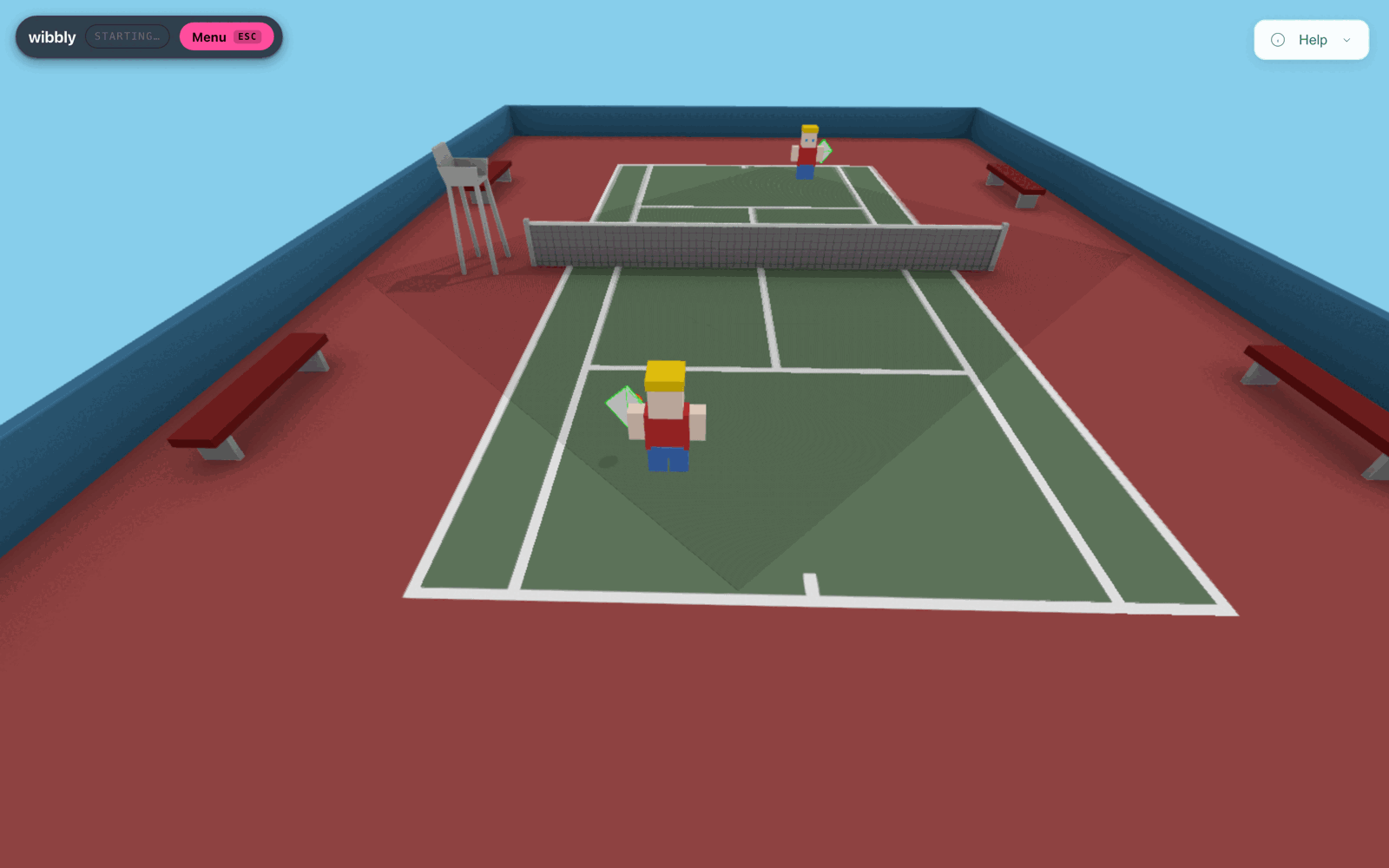
What this shot does and does not show. A real, unedited capture — the Three.js court, the player rig, the AI opponent, the in-game chrome. It was taken in headless Chromium against a synthetic camera stream (a rolling test pattern, not a person), so TensorFlow.js could not initialise a WebGL backend: there is no skeleton overlay and no camera preview panel, because neither had anything to draw. The status pill still reads STARTING… for exactly that reason. Nothing here is composited or staged — which is also why the pose overlay above is drawn as a schematic rather than faked as a screenshot.
It will ask for your camera. Nothing is uploaded — there is no upload path in the code. The MoveNet weights (~9.3 MiB) ship with the app and load same-origin from models/ — no CDN, no third-party request; the demo build refuses the CDN outright under its default-src 'self' CSP. Everything the tracker needs is served from the same place the page is.
Solo only. The peer-to-peer transport for a second player is built and wired in behind the scenes, but there is no lobby screen to turn it into a button — see the gaps.
Tennis
Playable nowSingle player, right or left handed, one gesture. Ball physics, court GLB, a player rig, an AI opponent and a chase camera. It consumes @vulos/wibbly-input like any third-party game would.
Soccer
Backlog, no codeChosen as the second game because a kick is not a swing — it is a lower-body gesture, and nothing in the library currently looks below the waist.
SwingRecognizer reads wrist velocity and ignores leg keypoints entirely. A kick forces GestureRecognizer to be plural in practice rather than in the type signature.Boxing
Backlog, no codeChosen third because it needs two independent gesture streams from one player — left and right hand, tracked separately with per-arm cooldowns.
Calibration.handedness models a single dominant hand. Boxing contradicts that outright, and — being head-to-head by nature — is also the natural first test of two-player local play.Palmworks
Playable, no handsAn industrial factory-building game folded into games/palmworks with its full history and its own build. Real, playable code — but hands are not wired to it: no game.json, no gesture recognizer, no camera control yet.
HandLandmarkTracker plus pinch/point recognizers now exist in packages/wibbly-input, but nothing wires them into Palmworks yet. Until then it plays like any other web app, by mouse and keyboard.Four seams, one game — not a platform
Game code never names a model, a runtime or a vendor — it sees four interfaces, and every seam ships a working default. Read left to right and the story is a reduction: pixels narrow into landmarks, landmarks narrow into identity, identity narrows into a few dozen bytes of intent. That reduction is the architecture and the privacy guarantee at once — and it is wibbly's own input pipeline, not something it sells to other developers. The platform underneath is magnetite.
Bars are on a log scale — 8 MB to 64 bytes is five orders of magnitude and would be invisible drawn linearly. The point is the direction, not the pixel widths: each stage destroys information the next stage does not need, and by the last one there is nothing left worth intercepting.
FrameSource
ShippedWhere pixels come from. WebcamFrameSource wraps getUserMedia and owns its own capture loop; a native Rust capture path arrives with the desktop shell. The detector no longer appends a preview widget to your <body> — the overlay is a component you place.
PoseTracker
Multi untestedPixels to skeletons, returning Person[] — the plural is the entire design decision. MoveNetMultiPoseTracker pins modelType: 'MultiPose.Lightning' and returns up to six skeletons with landmarks normalised to [0,1], which is what unblocked every multi-player capability.
GestureRecognizer
ShippedSkeletons to game events. detectSwing is a pure function over landmark history, so 24 of its tests run in CI with no camera, no GPU and nobody waving at a laptop. Handedness is a sign flip — the left-handed TODO is gone.
PlayerBinder
Fixtures onlyWhich skeleton is which player — the hard problem demos skip. SpatialBinder does greedy nearest-centroid matching over torso centroids, with a claim zone per player and a forget timeout for occlusion. It is covered by 18 tests; it has not yet met four real people in a real room.
Calibration
ShippedPer-player setup keyed to a PlayerId and persisted locally: handedness, reach envelope, torso scale, plus framing and lighting warnings via checkFraming. This is what killed the old isRightHanded = true hardcode — 15 tests cover it.
AdaptivePacer
ShippedThe original detector targeted 15 fps and additionally processed only every third frame — a fixed guess that was wrong on both fast and slow machines. AdaptivePacer measures real inference time and adjusts, so a fast laptop is not throttled to a phone's budget.
Why MoveNet, and why not the better models
A couch game has an unusual requirement: the cost of tracking must not depend on how many friends turn up. That single property eliminates most of the field before accuracy is even discussed — and licensing eliminates most of what survives. The full reasoning is in the model docs; this is the short version.
The property that decides it: flat cost
Pose models come in two shapes. Top-down models detect people first, then run a pose network per person — so four players cost roughly four times one player. Bottom-up models find all joints in one pass and group them afterwards, so cost is flat regardless of how many people are in frame.
MoveNet MultiPose is bottom-up, and TensorFlow.js explicitly documents that person count does not affect inference speed. For a game where two more people can walk into frame at any moment, a flat curve is not an optimisation — it is the difference between a design that works and one that degrades exactly when the party starts.
It is also the only multi-person model with published in-browser FPS numbers. Every other candidate publishes server-GPU figures that tell you nothing about a laptop running Chrome.
| Device (WebGL) | Single | Multi |
|---|---|---|
| MacBook Pro 15" | 104 fps | 54 fps |
| Desktop i9-10900K | 87 fps | 62 fps |
| iPhone 12 | 51 fps | 24 fps |
MoveNet Lightning, vendor-published in the tfjs-models README. Vendor numbers, but browser-real and reproducible — which is more than any rejected candidate offers. Those multi-person figures hold whether one person or six are in frame.
Rejected, and the reason on the record
Several of these are technically better models. They were still rejected — mostly on licences that make commercial use impossible, which is a trap that catches a lot of computer-vision projects late.
| Model | Licence | Why it lost |
|---|---|---|
| MoveNet MultiPose Lightning Chosen · in use | Apache 2.0 | Bottom-up, flat cost, up to 6 people, published in-browser FPS. Not the most accurate — the only one that meets the actual requirement. |
| MediaPipe HandLandmarker Chosen · built, not wired | Apache 2.0 | 21 landmarks per hand, multi-hand, first-class web support. The only realistic browser hand option. Its 8 canned gestures were too thin for games, so PinchRecognizer/PointRecognizer classify from raw landmarks instead. |
| RTMO bottom-up · CVPR 2024 | Apache 2.0 | Architecturally the right answer — 0.677–0.724 COCO AP at 8.9–19.1 ms. But those are V100 numbers, and there is no browser port and no WebGPU benchmark. Unproven engineering, not a drop-in. Kept as the documented phase-3 upgrade behind PoseTracker. |
| YOLOv8 / YOLO11-pose | AGPL-3.0 | Browser demos exist and it is fast. But AGPL-3.0 compliance requires open-sourcing the entire derivative work; a commercial non-starter without an Enterprise licence. A licence trap, not a technical one. |
| WiLoR best hand model | CC BY-NC-ND 4.0 | Non-commercial and no-derivatives — unusable twice over. Also depends on Ultralytics, which drags AGPL back in anyway. |
| HaMeR | Research only | Research/non-commercial terms, and MANO independently restricts commercial use. |
| MediaPipe PoseLandmarker | Apache 2.0 | Licence is fine; the architecture is not. Top-down, so cost scales with people. Documented failure mode: two people within ~75 cm at 3.5 m drop a detection — which is precisely the couch case. Google publishes no latency numbers for it at all. |
| ViTPose | Varies | ~1 FPS on a 2080 Ti. Not real-time by any definition, let alone in a tab. |
| MediaPipe Holistic | Apache 2.0 | Single-person only, no published benchmarks, and has carried a stale “upgraded version coming soon” banner since 2023. Stability risk. |
MediaPipe Tasks Web's “GPU” delegate is WebGL, not WebGPU — WebGPU for vision tasks remains an open upstream feature request. Anyone planning around “MediaPipe GPU” in the browser is planning around WebGL. If we want real WebGPU we are on ONNX Runtime Web, which is production-viable but materially more work. Every MoveNet number above is WebGL.
Browser-first, and why the desktop shortcut fails
Zero install is the platform's single biggest asset: a link, a wave, a game. The tempting alternative — wrap it in Tauri and get a “real app” — was researched and rejected as an architecture, not as a preference. It fails for four independent reasons, and the last one is arithmetic.
- No WebGPU on macOS/Linux WebKitWebKitGTK has none, and per a WebKit developer “nobody is working on it.” WKWebView on macOS 26 is unconfirmed — an open question we intend to test empirically rather than assume. Net effect: CPU-WASM only, roughly 3–5× slower.
- The Linux camera is broken by defaultDistro WebKitGTK ships without WebRTC/media-stream. Making
getUserMediawork at all means compiling WebKitGTK yourself, X11-only. That is not a shippable install story. - macOS permission bugsDouble prompts, and cases where the permission prompt never appears at all (
wry#1195,tauri#11951— both open as of research). - You cannot escape it by shipping frames to RustThe natural fix is to keep the webview for UI and do capture and inference in native code. Tauri's IPC is JSON-serialized, so this is where the arithmetic ends the argument.
The signal that settled it: no open-source Tauri app does webcam ML inside the webview. The closest one, Lazyeat, pairs Tauri with a separate Python computer-vision process — which is to say it also concluded the webview cannot do this.
A 1080p RGBA frame is about 8 MB. Thirty of them a second is about 250 MB/s of JSON-serialized IPC. Measured reality on Windows: 10 MB takes roughly 200 ms. The budget is not tight — it is off by orders of magnitude.
Which is the whole design of phase 2: Tauri is right for the app and wrong for the webview ML. Capture with nokhwa and infer with ort in the Rust core, and only landmarks cross IPC — kilobytes at 30 Hz, trivially cheap. That also sidesteps WebKitGTK entirely via V4L2, and unlocks RTMO, which the browser cannot reach.
Interim step worth taking first: a daemon plus browser UI — the Jellyfin / IPFS Desktop pattern. It solves the persistent-node problem, uses the user's real browser so WebGPU and the camera just work, and is nearly free once the browser build exists. None of this is built.
Camera frames never leave the device
This is wibbly's strongest property, so it deserves a mechanism rather than a slogan. The claim is not “we promise not to look at your camera” — it is that there is no code path that could send a frame anywhere, and the reason is structural: by the time the pipeline produces something worth transmitting, the pixels are already gone.
Why this is structural, not a policy
Inference is local because it has to be. A browser tab has nowhere to send 250 MB/s of frames that would be fast enough to play against, so the architecture that makes the game feel good is the same architecture that makes it private — the two requirements point the same way.
The pipeline is also lossy in the useful direction: a GestureEvent carries a player id, a gesture name, a confidence and a 2D vector. You cannot reconstruct a room, a face or a person from that, because the information was destroyed three stages upstream, in the tab, before anything was eligible to be sent.
- TodayLocal inferenceEvery frame is captured by
getUserMedia, run through MoveNet in the tab, and dropped. No frame is uploaded, stored or proxied. True of the code as it exists now, not of a future version. - Transport built, no lobbyEvents on the wireNetworked play is peer-to-peer: one player's browser tab is authoritative, and each client tracks its own camera and transmits only gesture events over a WebRTC
DataChannel— no backend wibbly runs, and no magnetite dependency anywhere in this path (packages/wibbly-p2p). The transport is built and unit-tested; what's missing is a lobby screen. Separately, a real magnetite game module — the reference arena-shooter, compiled to wasm — runs client-side today as the authority for solo tennis (@vulos/wibbly-authority); that link has nothing to do with hosting a second player's connection. - CaveatWhat we won't hideThe build used to initialise Firebase Analytics — central tracking, in a product whose thesis is the opposite. The SDK and its dependency are gone, and so is the Firebase Hosting deploy path:
dist/is static files, and whoever serves them is whoever you point at them. The MoveNet weights ship with the app and load same-origin — no third-party CDN, and the demo build refuses one outright. What that still cannot cover is the host you choose: a page served from someone else’s box tells them you asked for it, which is a property of the internet, not of wibbly.
Local inference buys privacy and gives up verifiability. Magnetite's replay verification assumes deterministic input; a camera is a nondeterministic sensor stream and cannot be replay-verified. So when networked play arrives, gesture games will run client-attested: whoever holds authority — a host's browser tab, or in principle a dedicated server — simulates over received events, and events are rate-limited and plausibility-checked against human-reachable velocities and cooldowns — but a determined cheater can synthesise them. Centralizing authority would not buy back that guarantee, since the cheat surface sits upstream, at the sensor — which is also the case for running wibbly's own multiplayer host-in-browser instead of on a server. That is a real limitation of putting the tracker on the player's machine, and it is the honest price of frames never leaving the device.
What's spec'd, not built
Said plainly, so nobody has to reverse-engineer it from the pitch. This list is deliberately the same size as the feature list.
- UnvalidatedMulti-person playThe tracker returns six skeletons and the binder assigns stable ids, both under unit test — but neither has been validated against real cameras and real people. Fixtures are not a living room. Treat couch multiplayer as implemented and unproven, which is not the same as working.
- UnvalidatedTwo-player tennisThe binder is configured for two claim zones; the game reads gestures for
player_1and ignores the rest. Nobody can currently join by standing in the right half of the frame. - Built, not wiredHand trackingMediaPipe HandLandmarker is chosen, licence-cleared, and now implemented:
HandLandmarkTracker,PinchRecognizerandPointRecognizerexist and are unit-tested, including distance-from-camera and rotation invariance. Two things are still not true: their thresholds are derived from geometry, not measured against a real hand, since no hand-tracking session has run against a live camera yet; andWibblyInput's pipeline does not compose the hand tracker, so nothing — including Palmworks — is gesture-driven by hands yet. - Transport built, no lobbyPeer-to-peer networked playThe settled design — host authority in one player's browser tab, guest
GestureEvents over a WebRTCDataChannel, copy-paste/QR signalling (Trystero optional), zero backend wibbly runs — is implemented and unit-tested inpackages/wibbly-p2p(PeerSession, offer/answer helpers, a link-sized codec; no magnetite dependency), and tennis wires an optionalPeerSessionin already, off unless a host page supplies a transport. What is not built: a lobby screen. Nothing turns the transport into a button a visitor can click. Free STUN, but no free TURN: peers behind symmetric NAT or CGNAT will not connect, with no workaround. Same-network play is unaffected. Two more things worth knowing ahead of time: WebRTC hands your IP address to the peer you connect to (and to the STUN server) by design — normal for any direct peer connection, and only a TURN relay hides it, which is exactly the infrastructure this design avoids running. This path needs no magnetite node, and never did. - SpecSoccer and BoxingBoth are tracked backlog items with a stated rationale, not works in progress. No soccer code and no boxing code exists. Where the app surfaces them as “coming soon”, that label now points at real backlog entries rather than at nothing — which is the most that can honestly be said for it.
- SpecA desktop shellTauri with Rust-side capture and inference is phase 3. Nothing has been started.
- SpecA release buildNo installer, no Docker image, no hosted service anywhere in the deploy path. Clone it and run the dev server, or build it and serve
dist/from any static server — nginx, Caddy, or Vite’s own preview. The configuration docs give the two things such a server needs to do.
Clone it, allow the camera, stand back
Source-only — there is no release build to install. If you just want to try it, the browser demo needs none of this.
git clone https://github.com/vul-os/wibbly
cd wibbly

npm install
npm test            # 86 seam tests, no camera required
npm run dev

# open http://localhost:5173, allow camera access,
# stand ~2 m back and swing. Set handedness in the
# camera preview — it applies on the next frame.
- 01Clone and installNode 20+, React 19, Vite, Three.js. The MoveNet weights are vendored under
public/models/and served same-origin — no CDN to reach on first load. - 02Run the seam testsThe recognizers, binder, pacer and calibration are pure logic, so they verify in about two seconds with no camera and no GPU. That is the point of the refactor.
- 03Stand back and swingAbout two metres, upper body in frame, even lighting. Tennis drives one player today, either handedness. Details in the docs.
Three phases, in risk order
The ordering is deliberate: the library blocks everything, and the highest-risk component inside it — the player binder — was built early rather than deferred. Full backlog in the roadmap docs.
Mostly landed
wibbly-inputscaffold, all DOM injection stripped- MoveNet MultiPose replaces SinglePose
SpatialBinder— highest risk, done earlySwingRecognizeras a pure, testable function- Handedness fixed; adaptive pacing replaces the throttle
HandLandmarkTracker+ pinch / point recognizers — built, not yet composed by the pipeline
Partly started
- Firebase Analytics removed
- Firebase Hosting removed — static files, any server
- Playable browser demo, no server, no account
- Real magnetite link —
AuthoritativeGamecompiled to wasm, running client-side as tennis's authority, no server - Tennis on the seam with 2-player local, one camera
- Palmworks folded in, not yet gesture-driven
- Soccer — first non-swing, lower-body gesture
- Boxing — two gesture streams from one player
Partly started
RtmoOnnxTrackeron ONNX Runtime Web + WebGPU, benchmarked against MoveNet — not started- Tauri shell with
nokhwacapture andortinference — not started - Peer-to-peer networked play — host-authoritative browser, WebRTC
DataChannel, no backend; transport built and wired into tennis, no lobby UI yet
Whether navigator.gpu exists in WKWebView on macOS 26 is unresolved in our research and needs testing empirically, not assuming. And there are no in-browser benchmarks for RTMO or YOLO-pose at any player count anywhere — if phase 3 proceeds we will have to produce those numbers ourselves, because there are none to inherit.

Listed alongside the Vulos suite
Vulos is a family of open, self-hostable software. wibbly is fully independent — it runs on a machine you control, needs no Vulos account and no Vulos infrastructure, and needs no payment of any kind — and shares the suite's posture that computation should happen where the data already is. Magnetite is the platform underneath it, providing identity, discovery, lobbies and hosting to whoever wants them; wibbly is a game built on top, not a second platform.
Where magnetite fits. A real magnetite AuthoritativeGame — the reference arena-shooter template, compiled to wasm — runs client-side, in the browser tab, as the authority for solo tennis: @vulos/wibbly-authority loads it and steps it as a Topology::SingleRoom match, the bottom rung of magnetite's own topology ladder, with no server anywhere. That's what makes "built on magnetite" literally true today, not a stated intention. It changes nothing about anti-cheat: magnetite still types camera gestures InputClass::Attested — never replay-verifiable — because determinism is a property of the simulation given its inputs, not of the inputs themselves. Separately, wibbly's own multiplayer is peer-to-peer in the browser (see the gaps) and has no magnetite dependency at all. Magnetite is worth running on its own terms regardless: a deterministic authoritative runtime, a WASM sandbox, replay verification, and bring-any-server hosting.